Top 10 benefits of using DocIt for document management
- Moumita Bhattacharya
- Oct 6, 2025
- 9 min read

Updated: Oct 22, 2025
A 2025 document management is not a matter of convenience but it is a matter of necessity. As remote working, digital classes, and paperless offices become the norm, users require high-speed, safe, and trustworthy implementation.
DocIt is unique in its one-stop concept, as it offers scanning, storage and sharing in a single streamlined application. No matter what you are (a student preparing notes or a business working on contracts), DocIt makes it easy. Its offline and cross-platform facilities are perfect for a current-day workflow.
This blog is devoted to the real-life advantages to the users, demonstrating how DocIt optimizes work, ensures the healthy work of files, and innovative mobile devices instead of bulky scanners.

Key benefits
In terms of document management, DocIt is associated with an advanced and wholesome solution. It helps to simplify each and every step from scanning to sharing.
The following part of this reflects 10 major benefits that make DocIt an essential tool for professionals, businesses alike, as well as learners.
Benefit | Feature |
All-in-one scanning | Edge detection, PDF/JPG export |
Secure storage | Encryption, local & cloud save |
Offline access | Scan/store offline, auto cloud sync |
Cross-platform support | Android, iOS, tablet, PC |
Easy file management | Folders, tags, smart search |
Business productivity | Batch scan, instant labeling |
Eco-friendly | Paperless, cost-saving |
Quick sharing | Email, cloud, messaging (PDF/JPG) |
Workflow integration | Google Drive, Dropbox, MS Office |
User-friendly | Simple UI, fast, crash-free |
1. All-in-one scanning

DocIt gives me everything under one roof. I scan the documents with an inbuilt OCR, give them out as PDF or JPG files, and save them on the spot. The edge detection is clear and precise, and that is why my scans are always clean and professional.
I have been using it on contracts, receipts, handwritten notes, whatever. I do not require individual applications or large hardware now. All multi-page scans are easy with DocI,t and I am able to arrange everything immediately after scanning.
It is quick and dependable as well as very convenient. Whether I’m scanning a single page or an entire batch, I know DocIt will get it right the first time.
2. Secure storage

I am a security-minded person, particularly when I am keeping confidential documents such as IDs, contracts, or financial documents. DocIt provides me with a sense of safety through encrypted storage and privacy as a priority.
I will have the option to save files on my machine or back them up to cloud-based storage- in both cases, I will remain in control. I am assured that my documents are not accessible to unauthorized parties, and to the extent of leaks and breaches, I do not need to be concerned.
The encryption software used by DocIt is robust and I leave my most important files in their hands. I am glad to be able to trust that my information is secure regardless of where I keep it.
3. Offline accessibility
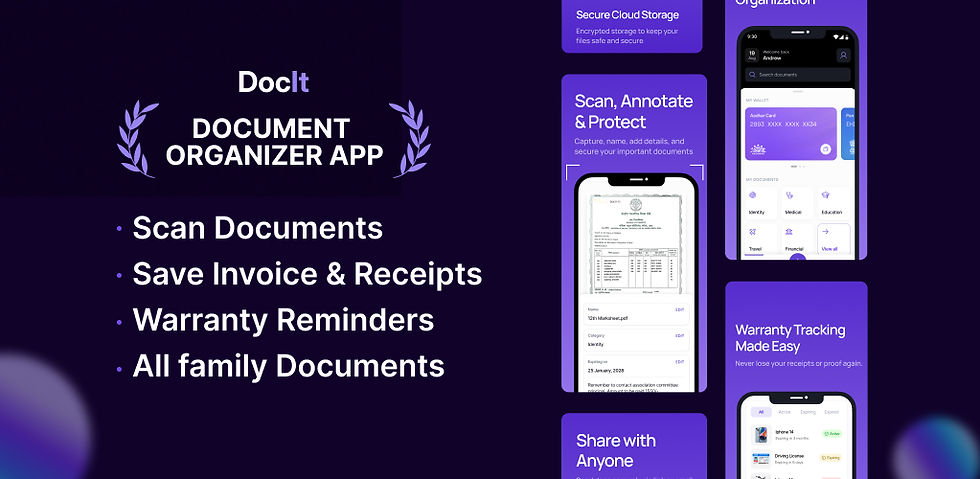
I don’t always have internet access, and that’s exactly when DocIt proves its worth. I am able to scan, store and manage my papers fully offline whether I am traveling, working in off-network areas or even in my effort to remain productive without Wi-Fi.
It is also encouraging to realize that I do not rely on a relationship to get things achieved. I have been able to use DocIt at airports, in classrooms, cafes and even on the field. It never lets me down.
When I get back online, all my files are automatically updated to the cloud, so that I have access to them on all devices. The offline availability allows me the liberty to work anywhere at any time and is uninterrupted.
It is one of the reasons why I use DocIt every day, the fact that it fits into my space and really helps with the work process, regardless of my location and the type of connection I have.
4. Cross-platform support
I rely on multiple devices daily, my phone, tablet, and occasionally a shared computer. DocIt can easily work with all of them, so it makes my work with documents easy. Being on Android or iOS, I am able to scan, save, and organize files without a hiccup.
The cloud sync keeps all things updated, hence I do not fear being in a position to lose track of the important documents. I begin scanning documents on my phone and finish organizing them on my tablet, and it always goes.
DocIt fits well with my digital way of life, allowing me to stay productive no matter where I am. When I'm at home, traveling, or working from a different location, I know I can access my files.
Being able to use it on different devices means I'm not stuck using just one, and I can switch between tools without any problems. This is one of the main reasons why DocIt has become a key part of how I handle my daily tasks.
5. Easy file management

The organization of my files was something that was always a problem. I would spend hours in overcrowded folders or documents with the wrong name and it was always daunting. Everything has changed since the time I began using DocIt.
I have now made folders of every category: work, personal, and school, and added tags that make it easy to sort and search. I employ clever naming systems, and it makes fixtures of a system very similar and easy to find. It has an inbuilt search tool that is quick and precise, hence I can get the right thing I want within a few seconds.
DocIt puts me on top of everything, whether dealing with business invoices, academic notes, or personal records. Even the folders about various projects are color-coded, and it makes it easy to navigate.
It seems as though I have a digital filing cabinet that fits in my pocket- systematic, convenient and available at any time. DocIt has helped me to make file management more of a pain-free, enjoyable experience.
6. Business productivity
DocIt has revolutionized the way I deal with business documents. I scan contracts, invoices and receipts at once, thus saving time and eliminating errors. The batch scanning facility is a savior- it allows me to batch scan a number of files and label them immediately.
All remains in order and I do not waste time going back and forth between applications. DocIt works perfectly with my workflow, be it when I am working alone or with a team. I make daily use of it to clean and make my records very handy.
It has simplified my administrative work and made me stay focused on what is important. To me, DocIt is not a scanner, but a product that offers a well-trusted productivity solution that keeps my company moving regularly.
7. Eco-friendly solution
Personally, I have always wanted to go paperless and DocIt has enabled me to do so. I have greatly decreased my use of prints, copies, and storage. I now print all stuff, such as notes, receipts, forms, etc., and store it online.
It is not only less harmful to the environment, but it is also cheaper to my wallet. I do not have to have piles of paper or large folders that can be cumbersome taking up space. Whenever I use DocIt, I am certain that I am making a sustainable decision.
It is pleasant to help lessen the amount of waste, while being organized and efficient. The most important thing that I like is that DocIt does not compromise my eco-friendly lifestyle.
I receive everything I require such as OCR, secured storage, sharing features, and remain determined to work in a green manner. It is a simple alteration, but it has had a huge effect on my way of handling my documents.
8. Quick sharing options
Sending documents was a hassle in my working process. I would scan something and save it and then I would have trouble in sending it on the right format or in the right channel. That is no longer the case with DocIt. I only scan, export, and send, in a flash.
I do not need to take any additional measures and can use email, cloud systems, or messaging applications to share files in PDF or JPG without any complications. It is quick, safe, and dependable whether I am handing in assignments, sending receipts or working with other employees.
The question of compatibility and delays is no longer a worry. DocIt does all the work, and I am able to concentrate on what is required. It has made the process of sharing documents to be easy and hassle free and I use it daily to ensure that things run smoothly.
This form of flexibility and speed have totally transformed my approach to the management and distribution of my files.
9. Integration with workflows

DocIt suits well into my current working process. I save my scanned files on Google drive, dropbox and Microsoft office, therefore, all files remain linked and are available.
I have configured automated backups so that I would not lose some crucial files and I also connect scanned objects to my task manager to ensure that the projects remain in motion.
This integration helps me to save time and manage my digital life. DocIt makes me efficient and focused whether I am doing personal work or running operations of the business.
I do not need to alternate between several applications and fear about manual uploads everything works in a streamline. To me, it is not a scanner; it is one of the essential components of my productivity system.
DocIt has become my work supplement as I can easily monitor the deadlines, documents and day-to-day tasks without a hitch.
10. User-friendly experience
I am not a tech expert; and I did not want to use a complicated application and dedicate hours to learning how to use it. DocIt was as simple as soon as I downloaded it. The interface is simple, the performance is quick and the rest all just works as I expect it to.
I did not need a tutorial, a manual, it seemed to be instinctive. I have referred DocIt to my friends, colleagues and even my own family and everyone has been offered the same hassle-free experience.
Opening one page or sorting hundreds of files, DocIt works without any crashes or hesitations. I like the fact that it is intended to be used by real people such as myself; it is not filled with geek-speak and high-tech devices that only get me lost.
It is not buggy, receptive, and does not flood me with features which I do not need. DocIt has been added to my list of favorite apps since it does not waste my time and makes document management seem easy.
Best practices for document management with DocIt
In order to fully utilize DocIt, I have followed several best practices that allow me to maintain a stress-free document management system. I also categorize my files into folders and tags and this aids me to arrange them into category or project.
I use uniform naming systems such that I can locate what I need in a short time, months after. This is because regular cloud backups ensure that I do not worry about losing my files, I can retrieve them at any time and any place.
My devices are synchronized enabling me not to be attached to a single place. I also employ my easein order to render scanned files searchable to save time when I need to find some specific information. Saving the old files will help me with less clutter and maintain the space in order.
These practices have had a huge impact on my digital life management. DocIt facilitates all processes and I find it easy to be organized, effective, and in control of my documents.
Why choose DocIt?
I chose DocIt since it is more than a scanner, it is a full document management solution. Its easy usage allows me to scan and convert text in real time, which is ideal with receipts, contracts, and hand-written notes. I love how easy it is to use. The interface is not crowded, and I do not have a sense of losing my way.
I have my files well secured, and can access them across all devices because of its cloud sync. Whether I’m using Android or iOS, DocIt keeps my documents organized and accessible. I rely on it with confidential documents due to its privacy-centric nature. It is also trustworthy, quick, and can be fitted into my working schedule without any complications.
FAQs
1) Is DocIt free?
Yes, it includes a free version that associated with some basic features. One can get more advanced tools such as batch scanning along with cloud sync with premium plans.
2) How secure is it?
DocIt can maintain the safety of your intact as it offers an end-to-end encryption that works with a strict privacy regulation.
3) Can it replace scanners?
Absolutely. DocIt's system and edge detection match up to regular scanners making it a solid alternative.
4) Does it work offline?
Yes. It’s very easy to scan as well as save documents without having an internet connection. It syncs when you get back online.
5) Is it good for businesses?
DocIt works well for small teams and big companies. It supports batch scanning, tagging, and fits into workflows.
6) Can students use it?
Of course. Students can scan notes, keep assignments in order, and share files even without Wi-Fi.
Final thoughts
In 2025, DocIt replaced other document management applications as my favorite. I can be organized and effective in my daily life with the help of such features as OCR, secure storage, offline access, and share it smoothly.
During the time that I deal with personal files or academic notes and documents related to my business, DocIt adjusts itself according to my needs and fits well into my working process. I like the fact that it is user friendly, environmentally friendly, and has good cross platform support.
It’s more than just a scanner; it’s a smart, mobile-first solution that replaces outdated systems and bulky hardware. Most important, it upgrades the entire process of document management and makes it secure, efficient and simple.
For me, it’s the best all-in-one tool available so, I genuinely rely on it to keep my digital life in order.

Comments